
Your country & currency

Make yourself at home. Choose your preferred shopping currency.

Your selected country opens its KickHost website. Your shopping currency is saved. Visit country website .

Guide

How to Change the WordPress User’s Display Name

You can change the display name of your WordPress account, which shows on WordPress posts and comments.

Share

You can change the display name of your WordPress account, which shows on WordPress posts and comments.

1. Log in to the WordPress dashboard.

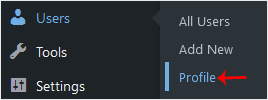
2. From the Dashboard menu, go to Users and click on Profile.
3. Locate Nickname and enter your new name.

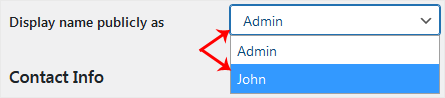
4. From the Display name publicly as, choose your newly added nickname from the drop-down menu.
5. Scroll down to the bottom of the page and click on Update Profile.

Found this useful? Share it.

Need a hand with this?

Our team can help you choose the right domain, hosting or server and set it up properly.

Talk to our team See hosting plans