
Your country & currency

Make yourself at home. Choose your preferred shopping currency.

Your selected country opens its KickHost website. Your shopping currency is saved. Visit country website .

Guide

How to Enable or Disable PHP’s display_errors via CloudLinux Selector in cPanel

Sometimes, we need to debug PHP. Hence, we need to enable display_errors or disable them for security reasons.

Share

Sometimes, we need to debug PHP. Hence, we need to enable display_errors or disable them for security reasons. You can do this using the CloudLinux Selector to enable or disable PHP’s display_errors in cPanel.

1. Log in to your cPanel account.

2. In the Software section, click on Select PHP Version.

3. Click on the Options menu.

Note: If the Options page shows an error related to the native PHP version, change it to a non-native version first.

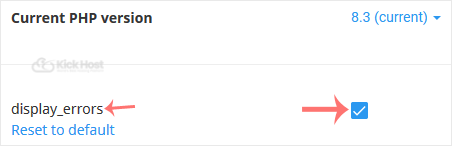
4. For enabling display_errors, tick mark it. For disabling it, uncheck it.
Found this useful? Share it.

Need a hand with this?

Our team can help you choose the right domain, hosting or server and set it up properly.

Talk to our team See hosting plans