
Your country & currency

Make yourself at home. Choose your preferred shopping currency.

Your selected country opens its KickHost website. Your shopping currency is saved. Visit country website .

Guide

How to Increase or Decrease PHP Memory Limit via CloudLinux Selector in cPanel

You can modify PHP Memory Limit as per your needs using CloudLinux PHP Selector in cPanel.

Share

You can modify PHP Memory Limit as per your needs using CloudLinux PHP Selector in cPanel.

1. Log in to your cPanel account.

2. In the Software section, click on Select PHP Version.
3. Click on the Options menu.

Note: If the Options page shows an error related to the native PHP version, change it to a non-native version first.

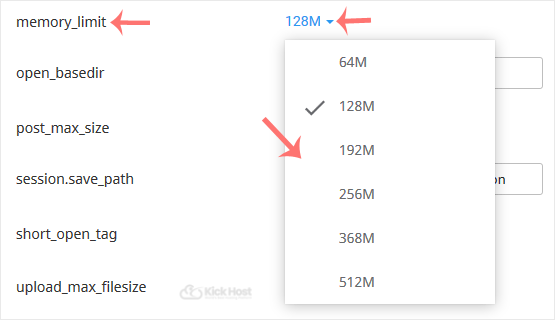
4. Look for memory_limit and click on the drop-down option displayed in front of it. Then choose the appropriate limit as per your requirements.
Found this useful? Share it.

Need a hand with this?

Our team can help you choose the right domain, hosting or server and set it up properly.

Talk to our team See hosting plans