
Your country & currency

Make yourself at home. Choose your preferred shopping currency.

Your selected country opens its KickHost website. Your shopping currency is saved. Visit country website .

Guide

How to Change cPanel’s Style/Theme

Switching over to another cPanel theme with a different style is easy.

Share

Switching over to another cPanel theme with a different style is easy.

1. Log in to your cPanel account.

2. In the General Information panel. You should see a Theme option with a drop-down menu.
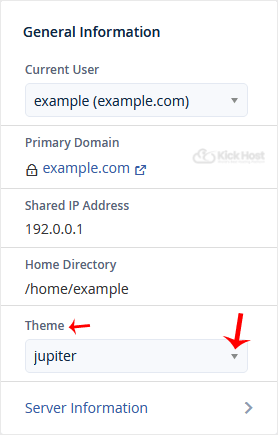
3. Choose your favorite theme from the drop-down menu, and it will apply automatically.

Found this useful? Share it.

Need a hand with this?

Our team can help you choose the right domain, hosting or server and set it up properly.

Talk to our team See hosting plans